I posted recently about simulating the Belousov-Zhabotinsky reaction in Houdini. Although it worked, it wasn't particularly aesthetically pleasing, so here's a hopefully prettier version using a slightly different approach.
In a nutshell, I scatter metaballs over the surface of a sphere and update the color and scale of each metaball based on the solver from the earlier post. The guts of the project lives in a single geometry node and looks like:
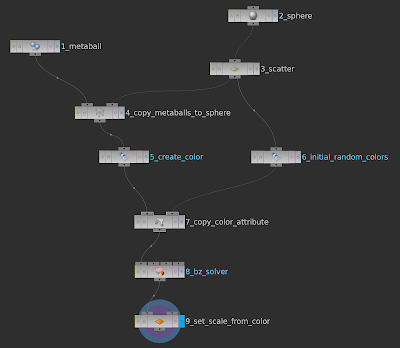
- The metaball node creates a single metaball.
- The sphere node is the main "scaffold" over which the metaballs will be distributed.
- The scatter node distributes points across the main sphere.
- The copy_metaballs_to_sphere node creates multiple copies of the metaball at each of the points created by the scatter node.
- By default, the copied metaballs don't have a color attribute, the create_color node creates that attribute.
- The initial_random_colors node assigns a random color to each point generated by the scatter node.
- The copy_color_attribute node copies the random point colors to each metaball.
- The bz_solver node uses the VEX from Simulating Belousov-Zhabotinsky Reaction in Houdini to execute the simulation.
- Finally, the set_scale_from_color simply sets the x, y and z scales based on the color using the expression: (@Cd.r + @Cd.g)
Easy!
Attributes are a core concept in Houdini, I'd thoroughly recommend watching Houdini Concepts Part 1 to learn more about them and the magical Attribute Copy node.